
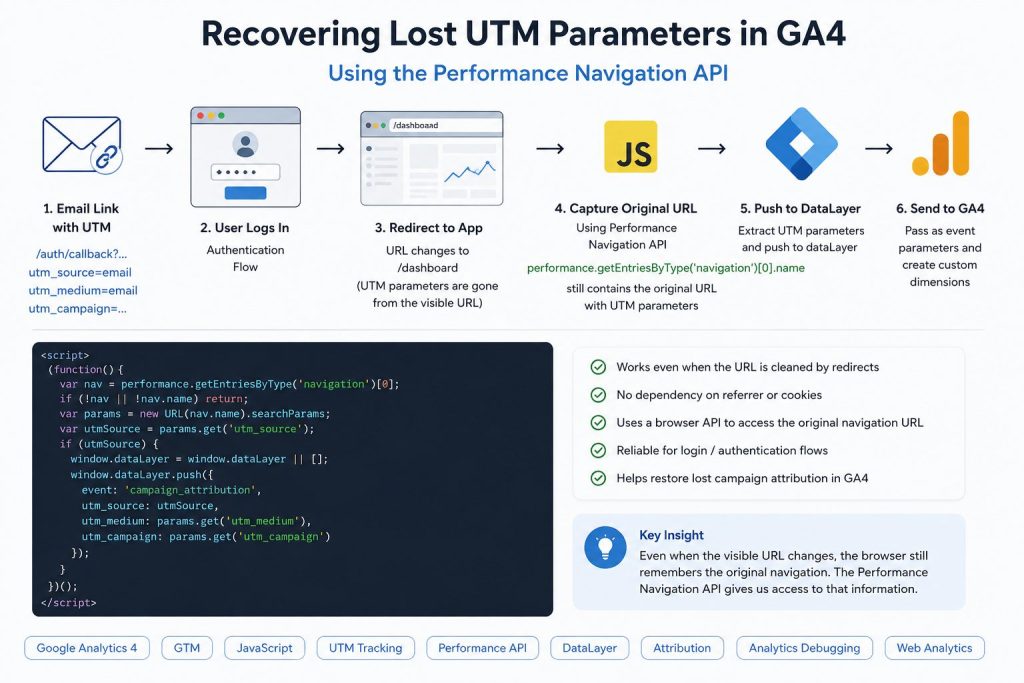
In Smart Clouds recently ran into a case where campaign attribution disappeared in GA4 after users clicked an email link containing UTM parameters. UTM parameters are one of the most common ways to measure campaign performance in Google Analytics 4. In a typical flow, a user clicks a tagged URL, lands on a page, and GA4 attributes the session to the campaign automatically.
However, modern authentication flows and JavaScript applications introduce a subtle problem: the original URL often disappears before analytics tools have a chance to read it.
We recently ran into exactly this scenario.
A registration email contained a link like this:
/auth/callback?...&utm_source=emailThe expectation was simple: users click the email, complete login, and GA4 records the visit as coming from an email campaign.
Instead, analytics showed missing attribution.
The Problem: Authentication Redirects Remove UTM Parameters
The application used a login endpoint that immediately transitioned users into the main app experience.
After the flow completed:
/auth/callback?...utm...
↓
/dashboard
The final page URL became clean.
Traditional approaches failed:
window.location.searchreturned an empty stringdocument.referrerwas emptysessionStoragehad no campaign information- Network requests showed the original URL, but browser JavaScript cannot access DevTools network history
At first glance, the campaign data appeared lost.
Discovering an Unexpected Source of Truth
The breakthrough came from inspecting the browser’s Navigation Timing API.
Running:
performance.getEntriesByType('navigation')[0]returned:
{
  "name": "https://example.com/auth/callback?...&utm_source=email"
}
Even though the visible URL had already changed, the browser still retained the original navigation entry.
That meant the campaign data was still available.
Extracting UTM Parameters from Performance Navigation
The solution was to read the original navigation URL and push the values into Google Tag Manager.
Example:
<script>
(function() {

  var nav = performance.getEntriesByType('navigation')[0];

  if (!nav || !nav.name) return;

  var params = new URL(nav.name).searchParams;

  var utmSource = params.get('utm_source');

  if (utmSource) {

    window.dataLayer = window.dataLayer || [];

    window.dataLayer.push({
      event: 'email_onboarding',
      utm_source: utmSource,
      utm_medium: params.get('utm_medium'),
      utm_campaign: params.get('utm_campaign')
    });

  }

})();
</script>
This script was triggered early in GTM before application routing completed.
Sending Data to GA4
Once values were pushed into dataLayer, they were exposed as:
utm_sourceutm_mediumutm_campaign
and sent to GA4 as event parameters.
Custom dimensions were then created inside GA4 to report on campaign performance.
Why This Works
The key insight is that browser navigation history and browser location are not always the same thing.
Single-page applications, authentication flows, and URL rewriting may erase campaign parameters visually, but the browser’s performance timeline can still preserve the original request.
If UTM attribution disappears during login or redirect flows, the Navigation Timing API can become a surprisingly effective fallback.
Found this useful?
Bookmark this guide and share it with anyone working on GA4, GTM, authentication flows, or campaign attribution debugging.